施文彬-誰是老大 (Cover of Michael Jackson’s Beat It)
https://www.youtube.com/watch?v=9atxVFtfr24

Agilent 54641D has a ADC hybrid (1NB7-8394) converter that runs very hot. The heatsink does a very good job extracting the heat from the chip, but there’s nothing to carry the heat away from the heatsink. The heatsink is actually hand-burning hot when passively cooled. Even with the case, the bottom of the unit gets so hot that it actually warms up the instrument below it.
For longetivity, I decided to give it a tiny fan. But given the tight space at the bottom, how can I squeeze a standard 5mm fan? A squirrel cage fan (preferably 5mm side, 15mm thick) might do the trick, but where am I supposed to secure it? Turns out there’s a screw hole for the fan and there’s only one place I can screw it down:
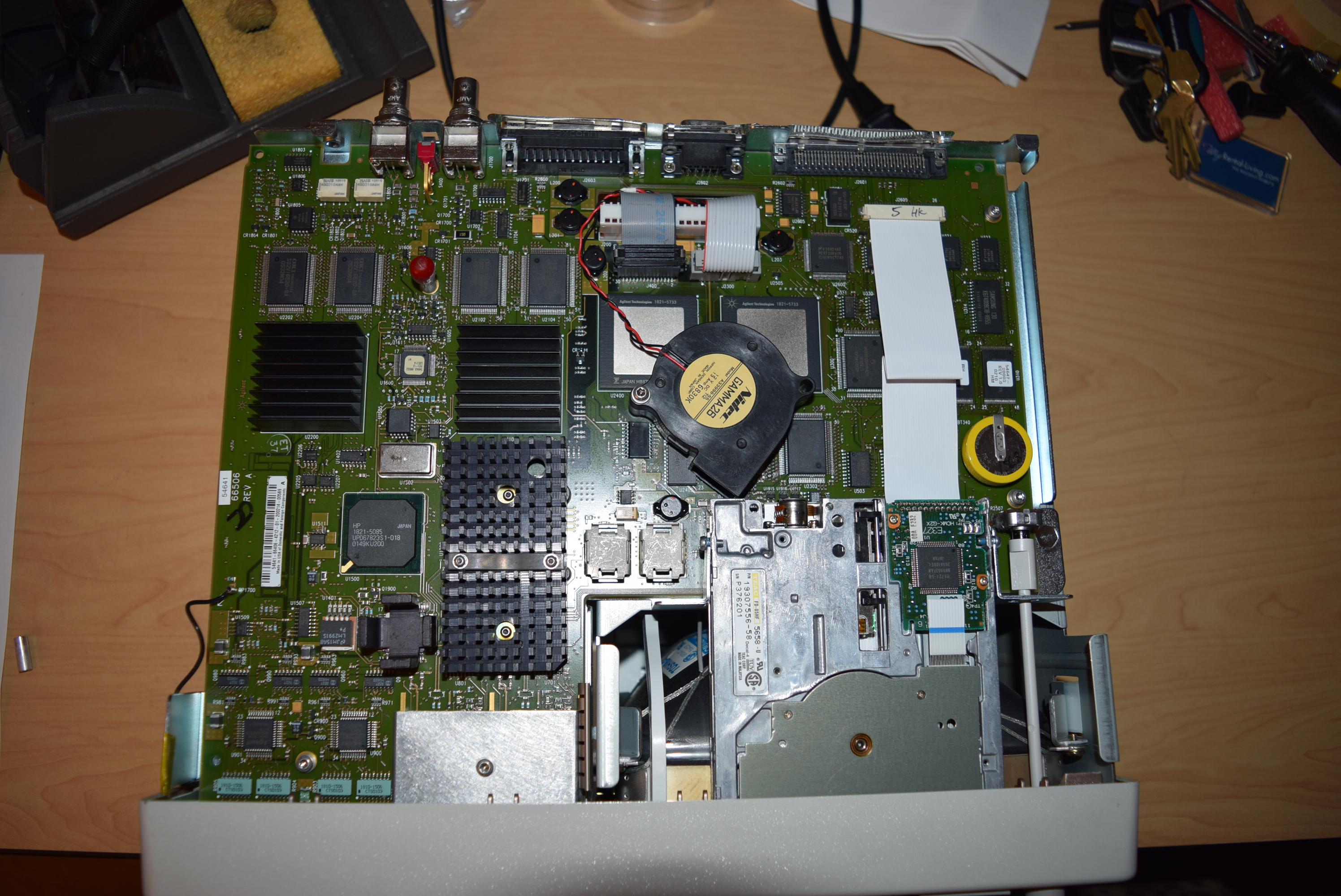
I padded the fan with 3 plastic washers to create a surface level with the two ASIC chips the fan is sitting on.
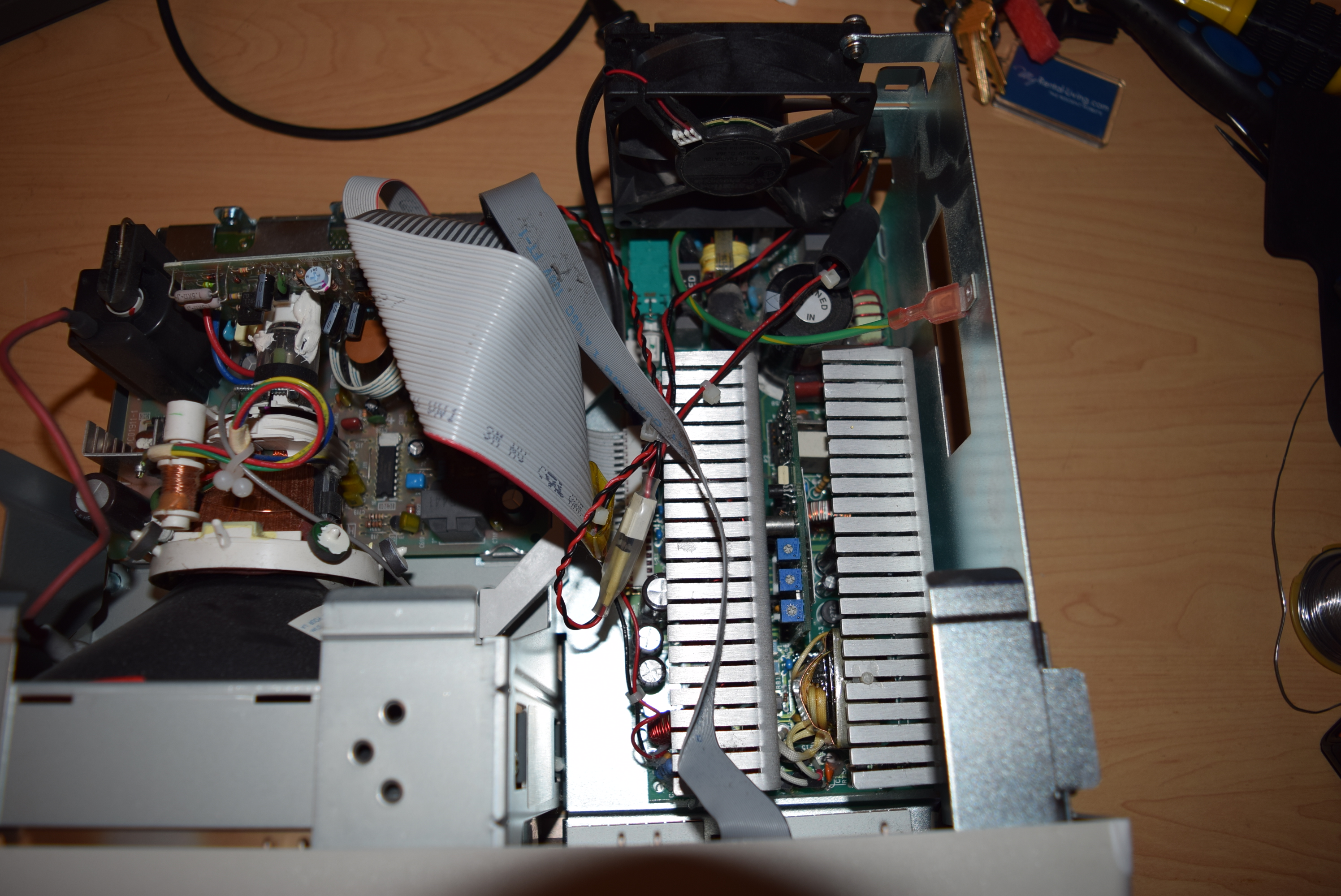
Where should I get the power for the fan? It’s not a low-end 100Mhz scope, so I took extra precaution to not have a DC power line flying all over the circuit board to generate noise. I twisted the power wires together just to lower the EMI and follow the same holes Agilent designed to let the power cable go through.
It’s a little risky to steal power from the circuit board directly when I don’t have the schematics, but luckily I found a printer power port which nowadays nobody uses which I can steal the power from.
I could have tapped the 12V fan power from the power module for the power supply fan, but I noticed the printer power port is even better: it’s around 7~9V: I don’t want the noise from running it at full speed (squirrel cage fan are typically noisier).

Finally I made an internal terminal for the printer power so the fan can be easily detached. Weakly wrapped it in a clear heat shrink tube so it won’t get accidentally disconnected yet reminds myself that a connector was built instead of directly soldered on.
At last I tie-wrapped the power wire to the other power wires Agilent already secured so they won’t dangle during transportation.
Self-calibration expects the temperature to be stable, so the oscilloscope needs to be warmed up before a cal would register. That means before the fan, it’d take a long while for the ADC to heat up to a guaranteed temperature.
With the new fan, the calibration needs to be done again because it’s much cooler now. Even better, it takes nearly no time to warm the oscilloscope up for calibration because the steady temperature isn’t high anymore.
Of course this mod works for 54641A, 54641D, 54642A, 54642D as well. Technically you can put it in any 5462X oscilloscope, but since they are 100Mhz, you don’t need to cool the ADC down that much.
I recently tried it on a 54642A, which has only one stream instead of two, so one chip with glued heatsink and one ASIC (1821-5733) is gone. Looks like I can use the screw hole on the top left (the one with a red condom over it). Unfortunately, since the only way to use that screw hole is to flip the fan over, it became an inferior choice because
In other words, even if it looks tempting to deviate from my original solution for the non-MSOs, there’s no good reason doing so.
Now that I have a seek thermal camera module, here’s the thermal picture after the fan has been installed (accompanied with the picture of the board):
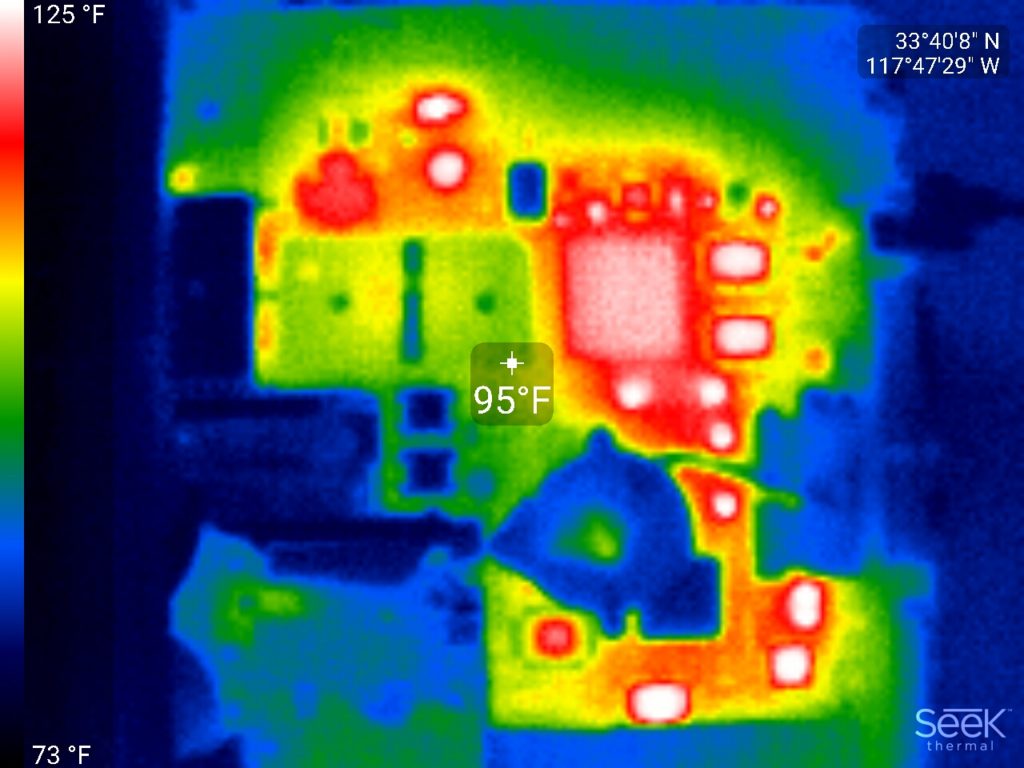
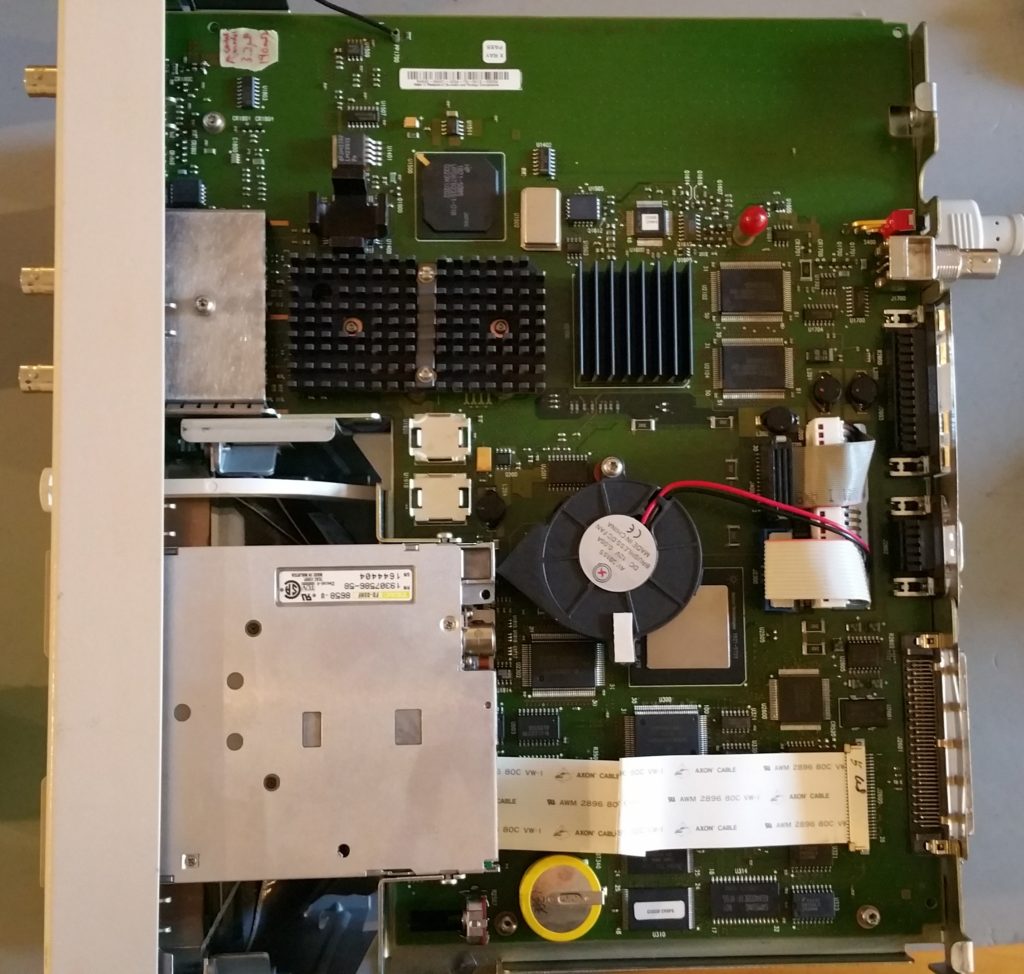
You can see from the thermal picture how effective the heatsink is. It took only a very weak breeze to carry the majority of the heat away. The 12V squirrel cage fan running at ~7V is pretty quiet, yet it cools the ADC hybrid down to near room temperature.
The real reason why I did this fan mod is because I had some units (like 54641A) bought from the used market that after powering it up for 30 minutes, the signal displayed just went nuts and jumped all over the place. I opened up the ADC and the metal bracket holding it down had a lot of heat stress pattern on it (the golden bracket looked purple-rainbowish). The unit was fixed after swapping the ADC hybrid from a donor unit, but now I know the ADC hybrid really needs to be kept cool to ensure longevity.
EDIT: I’d ask my kind readers NOT TO use the technique learned here to offer products and services that might compete with my offerings. Feel free to apply it to units that you’ll keep for yourself. I’ll trust you 🙂
If you have a time-consuming for-loop in a script and you want to terminate it for some reason (like checking partial results, debugging, etc) but you don’t want to start over again. What would you do if you want minimal typing each time you stop?
Here’s how I do it:
if( exist('k', 'var') ) k0=k; else k0=1; end
for k=k0:1000
  % Your code here
end
If you want to restart the loop, simply enter k=1 in the command prompt and you’re good to go. Otherwise it will pick up where you left off.
A coworker whose background is in embedded systems (with a C background and no MATLAB at all), after hearing my rants that people are coding MATLAB like C using way more for-loops than necessary, asked me if he has two vectors,
a = 0:32767;
b = 0:32767;
and he want all combinations of the elements in  and
and  so that for each index pair
  , he will get
![\[ 167\left(\frac{a_j+42}{b_j+17} \right)\]](https://wonghoi.humgar.com/blog/wp-content/ql-cache/quicklatex.com-43568ef19d3f801a0929142be0f0f504_l3.png "Rendered by QuickLaTeX.com")
There are  combinations out there. At first, I showed him the typical method shown in the MATLAB’s introduction materials:
% Should have used ndgrid() for a more natural (column first) layout
[B, A] = meshgrid(a, b);

C = 167*(A+42)./(B+17)
Then he asked, ‘This way I have to store the matrices  and
and  . Wouldn’t it be memory intensive? Is there a better way to do it like with functional programming?’ Now I have to show him a more advanced trick that requires some mental leaps (the ones necessary to get sophisticated at the MATLAB language):
C = 167*bsxfun(@rdivide, a'+42, b+17)
This one liner does not save intermediate input values, so it’s memory efficient as well.
bsxfun() is a function that takes two inputs (we call it a binary function) which any of them can be a matrix, vector or scalar. It will conceptually expand the dimensions so the function handle (e.g. @rdivide) get to apply to all combinations as if the inputs are expanded (repeated) to the longer of each dimension supplied. I bet under the hood it’s just a pair of for-loops with the loop increments managed so it doesn’t waste memory storing the intermediaries.
In the example above, I have a column  and a row
  . The output
  is arranged as if is copied right to meet the length of , and is copied down to meet the length of .
This involves two major concepts one needs to program the MATLAB way : vectorization and anonymous functions. Not something you’d tell a day-zero beginner (probably scare them off), but showing them a Ninja trick after they understand the beginner’s method might motivate them to learn the true power of MATLAB.
Rik has pointed out in the comments below that TMW introduced implicit expansion that makes the bsxfun() obsolete. This is an excellent move (readability), despite it won’t police matrix crimes anymore so educators should teach about implicit expansion as the first thing as it’d be hard to debug is the user is not aware of the behavior. Thanks Rik!
When your MATLAB project gets large, or when you have a lot of projects, it’s time to consider restructuring your code and libraries so you can focus on what matters the most instead of plowing through the mess you just created.
For my projects, I usually create a file called ‘managedPathAndFiles_{myProjectName}.m’ at the top-level folder. The comments in the demo code below highlight the techniques used:
function [file, folder] = managedPathAndFile_myProject(isRegenerated)
% isRegenerated: set to 'false' to skip addpath() (which is slow)

 % Optional default input arguments by name instead of couting nargin
 if( ~exist('isRegenerated', 'var') )
   isRegenerated = true;
 end

 % Note the use of nested structures (like replacing _ with .)
 % You can use the hierarchy to group folders/files in a way you can
 % operate on them in one-shot

 % Use the location of this file as anchor
 % 'pwd' is unreliable because you can call this from other folders if
 % it's in MATLAB's path
 folder.root = fileparts( mfilename('fullpath') );

 % Include your project specific subroutines in the MATLAB path
 % Use fullfile() to generate platform independent folder structures
 folder.core.root = fullfile(folder.root, 'core');
 folder.core.helper = fullfile(folder.core.root, 'helper');
 % Add all the paths under the folder in one shot
 if( isRegenerated )
   % '-end' avoids name conflict by yielding to the incumbent paths
   addpath( genpath(folder.core.root), '-end' );
 end

 % Automatically create data storage folder
 folder.data.root = fullfile(folder.root, 'data');
 folder.data.cache = fullfile(folder.data.cache, 'data');
 if( isRegenerated )
   % Outputting something will absorb the error if the path alreayd
   % exist. I made a mkdir_silent() in my libraries, but used the
   % native call here for demo.
   [~, ~] = structfun(@mkdir, folder.data);
 end

 % Sometimes you might have config or external files to load
 file.data.statistics = fullfile(folder.data.root, 'statistics.mat');

end
Many people don’t know about the function genpath() so they ended up lumping all their dependencies in one folder which makes my eyes bleed. Organize your files into a tree that makes sense now!
I’d recommend any serious MATLAB developer build their own library folder with a consistent naming and a sensible tree hierarchy. After looking into FEX and what’s natively available in MATLAB and you still need to roll out your own code, you’re likely to rediscover what you’ve already built just by establishing a new .m file/function you are about to write in the folder you’d most naturally put it in (like people with like mind: self, tend to pick the same names).
Sometimes you have to whip up some ‘crappy’ code that doesn’t generalize (or can be reused) in other contexts. Consider putting them in a /private folder under the caller so it won’t be visible to everybody else. Of course, I encourage people spend a little more time to write the code properly so it can be put in your own MATLAB library.