Qemu started off as a software emulator at user space (Type 2 hypervisor like VirtualBox) when there weren’t hardware features specifically supporting VM use cases.
KVM extended Qemu to take advantage of hardware features that accelerates virtualization which requires kernel space (OS low level direct) access, more directly handing off requests to hardware instead of going exclusively through the emulated fabric.
Conceptually I think of KVM as the kernel space (low-level hardware drivers / hardware accelerator) portion of the software while Qemu is the user space (interactive) portion of the software.
What made it confusing is that KVM was a fork of Qemu, so they were seen as one package when people said ‘KVM’ (when they should have said qemu-kvm). The responsibilities are not that clearly separated as far as Linux is concerned but when we get to MacOS/Windows, we start to appreciate the distinction that KVM is the kernel-based hardware accelerator itself while Qemu is the whole idea of virtualization.
This is confirmed by Qemu’s docs:
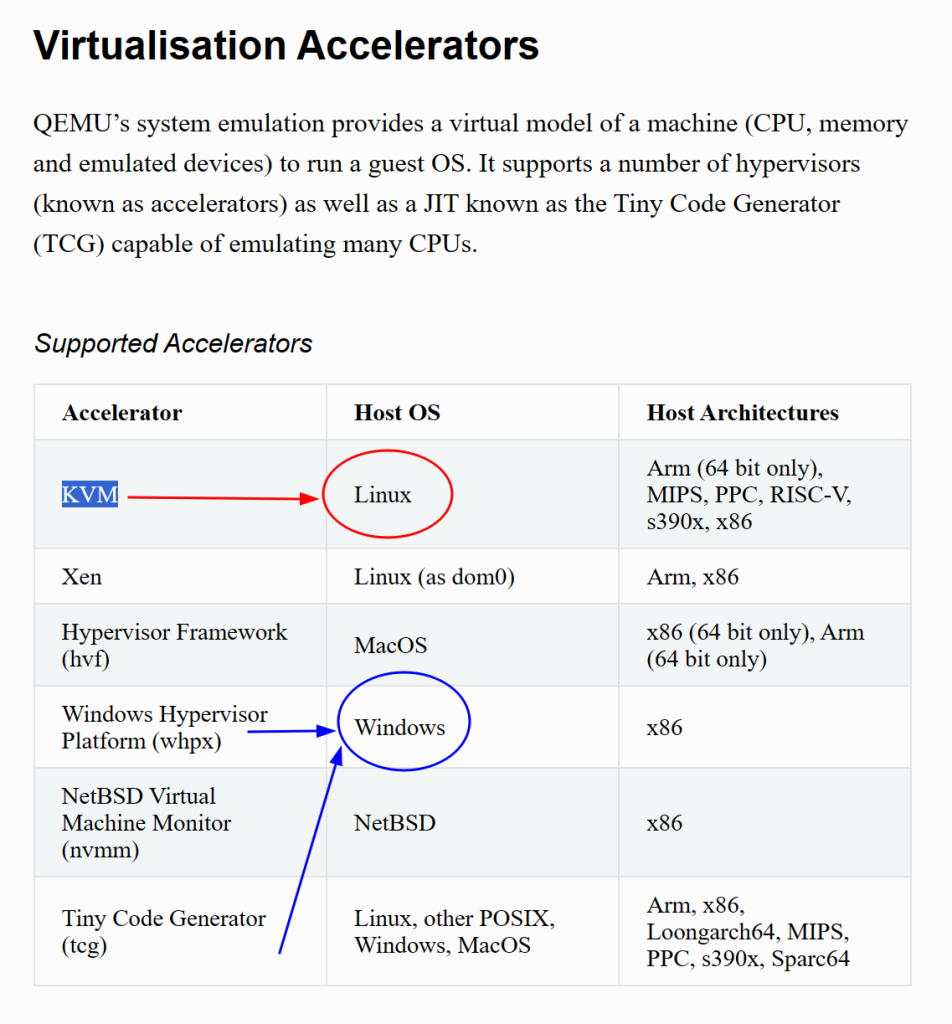
KVM made no sense in Windows, as Microsoft is obviously going to implement KVM in its kernel. Straight ports of Qemu to Windows retained the KVM lingo, which confused the hell out of me.
Since KVM does not exist on Windows. Intel use to make HAXM for its processor on Windows, but they discontinued it. Microsoft’s version of real hardware accelerator is WPHX. These are the only 2 available hardware acceleration options for Qemu on Windows.
TCG (Tiny Code Generator) is not real hardware acceleration, but more like an on-the-fly machine code (think of it as assembly for those who don’t know the difference) instruction translator that matches the VM guests’ instruction set with the host hardware’s instruction set.
People usually call ‘KVM’ (qemu-kvm) a Type 1 hypervisor but the line is blurry. Does it still count as Type 1 if you add an FTP server on the linux distro that hosts the KVM? What makes KVM fast was its hardware acceleration through the kernel, but the user-space qemu calls can make these kernel calls by using KVM as a hardware accelerator.
In my opinion, whether it’s Type 1 or Type 2 mostly boils down to intent on whether you are dedicating the computer to serving VMs. Most people nowadays won’t insist on foregoing available hardware acceleration (which is kernel space) to solely run the VM as a purely software emulator. The VM idea is to decouple the hardware from the software, who cares if you let the host computer take a side job (like running a FTP server) as long as virtualiation overhead is the same?
