characters (\d digits,\w word (i.e. letter/digit/underscore), \s whitespace).
[]character classes (define rules over what characters are accepted, unlike the . wildcard) [3-7] hypen inside [] bracket can specify ranges to mean things such as `[3,4,5,6,7]` [^ ...] is the mirror of it to exclude the mentioned characters
|choices (think of it as OR)
Complement (i.e. everything but) version are capitalized, such as \D is everything not a \d
whitespaces (\n newline, \t tab,
Modifiers
repetition quantifiers (? 0~1 times, + at least once, * any times, {match how many times})
(? ...)inline modifiers alters behaviors such as how newlines, case sensitivity, whether (...) captures or just groups, and comments within patterns are handled
Positioning rules
anchors (^ begins with, $ ends with)
\b word boundary
Output behavior
(...)capturing group, (?: ...)non-capturing group
\(index)content of previous matched groups/chunks referred to by indices. This feature generates derived new content instead of just extracting
(?( = | <= | ! | <! ) ...assertions...)lookaroundsskips the contents mentioned in ...assertion... before/after the pattern so you can toss out the matched assertion from your capture results.
(?s) Also match newline characters (‘single-line’ or DOTALL mode)
Starting with (?s)flag (also called inline modifiers) expands the . (dot) single character pattern to ALSO match multiple lines (not by default).
Useful for extracting the contents of HTML blocks blindly and post-process it elsewhere
(?m) Pattern starts over as a new string for each line (‘multi-line’ mode)
Starting with (?m) flag tells anchors ^ (begin with) and $ (end with) to
Assertions: use lookarounds to skip (not capture) patterns (?( = | <= | ! | <! ) assertion pattern)
< is lookbehind, no prefix-character is lookahead. -ahead/-behind refers to WHERE the you want TO CAPTURE relative to the assertion pattern, NOT what you want to assert (match and throw) away (inside the (? ...) )
= (positive) asserts the pattern inside the lookaround bracket, ! (negative) asserts the pattern inside the lookaround bracket MUST BE FALSE.
Assertions are very useful for getting to the meat you really want to capture rather than sifting through patterns introduced solely for making assertions that you intended to throw away
Out of the box, Cinnamon decides to group the taskbar buttons like later Windows did. It’s often a huge annoyance to people who hates context switching in our head (I like huge workspaces that I can see everything at once so I don’t overlook clues from the relationship between things I’m working on. This is how I find difficult twists in research problems that other people give up solving).
In Windows, you right click on the taskbar, get to settings and there’s a pulldown menu for you to decide whether and how the buttons are grouped. Easy. But Cinnamon still have the Linux smell: organize things that are logical to programmers but not users (Tektronix, DD-WRT, etc. does that too), then surprise users with poorly thought out default behavior.
This time it’s a can of worms that requires some web searching to find people with the same exact specific problem (it’s a sign of poor UI design if the users cannot guess from the UI how to do what they want).
Needing to change whether buttons are grouped is common. It should not take a lot of steps to change the behavior, preferably a right click context menu
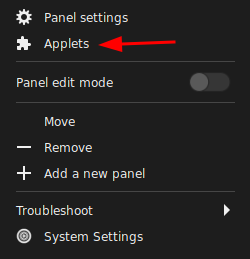
I would have thought it’s under Panel Settings, but hell no, things has to be organized the way the code was designed (sarcasm). It turns out that the windows button grouping is handled by an Applet called “Grouped Window List”
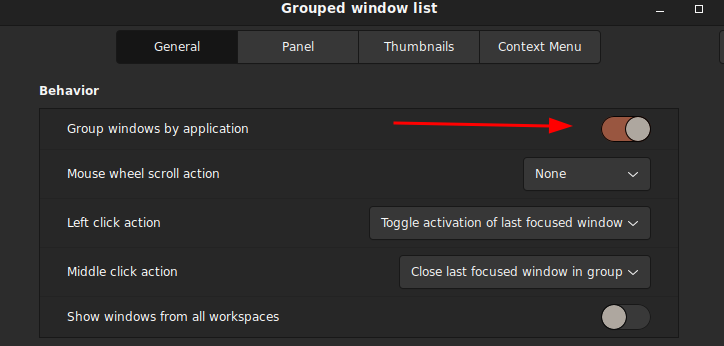
Some user suggested removing the applet altogether (turns out it’s wrong and unnecessary as turning it off will disable the taskbar altogether and there’s an option to disable it within the applet’s setting: the applet itself is the windows list, not just the grouping feature), but by default the applet was not activated the settings button is dead. I have to go to the bottom navigation bar in the window and hit the ‘+’ sign to get to the settings so now there’s a check mark next to it and the setting (gear) button is now activated.
They also did not dim the settings button (two gears) when the ‘grouped window list’ is not activated (bug?), which made me think I can configure an Applet that’s not in use. Not to mention the previous settings got cleared (reset) if I disable the Applet and re-enable immediately afterwards (bug?)!
This is where I think the UI design’s really messed up. After you activate/deactivate the “Grouped windows list” applet, the buttons aligned right instead of left (default)! WTF!?! Do not do shit to surprise users! There’s absolutely no freaking logical reason why the taskbar button alignment should change the default (or the current state) for any reason!
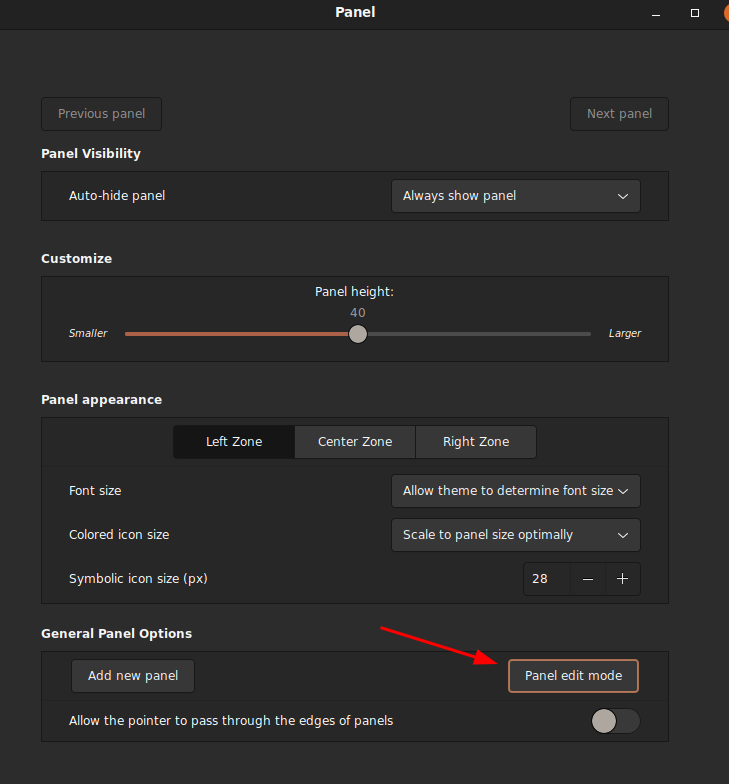
To fix this, you have to so something similar to unlocking the taskbar in Microsoft Windows to move the task button bar. It’s easy in MS Windows as you just right click context menu on the taskbar to unlock and just drag the starting separator (the || bar on the leftmost where the taskbar starts) to specific position you wanted. In Linux/Cinnamon, you have to enter the ‘Panel Edit Mode’ to unlock the taskbar so you can drag things around:
I was confused while dragging the task button bar because there’s no clear position markers of where the task button starts and where it can ‘snap to grid’. It’s easy to drop it to the center to align center, but to align left, you have to watch for the buttons you want to insert before to move around to tell if it was a valid place to drop your new taskbar position What a pain in the butt!
This UI design suck, and I can totally understand why they would do something like this because of my programming background. It’s very logical for the programmer to modularize it as one applet, but first of all, generic suffixes like -let and -get does not help users get what the name means: it’s geeks’ way to name abstract concepts without getting the essence of the use case.
In MS Windows, the ‘Applets’ are organized roughly the same as ‘Toolbar’, except Windows is slightly more specialized that they have a ‘Toolbar’, ‘Start Menu’ and ‘Systray’ as distinct concepts instead of abstracting them into a higher level object as in ‘Applets’.
The biggest gripe I have about Cinnamon’s design choices is that detailed position adjustment needs to be easily accessible it’s likely that user preferences may vary a lot.
By not having a separate Toolbar concept, they forgot to add direct ‘unlock grouped windows list (aka tasklist toolbar in MS Windows)’ option (context menu item). You have to click through ‘Preference > Configure’ to get to get to configure the ‘Grouped window list’
Since the ‘Grouped window list’ is a (container) ‘bar’ within a bigger’ bar’ (Panel), the position of the window taskbar is logically organized under the platform (the bigger bar, hence the Panel), therefore the unlock window taskbar setting belongs to Panel, not Applet. This makes sense to programmers who knows that the feature is conceptually organized as container objects, but this is hell of confusing for users if they have to reason through this when they are trying to do one of the most common things!
Unlike MS Windows, you cannot use the task buttons while you are in Panel edit mode. Panel edit mode (you enter a special mode where you drag objects into positions you like, but cannot actually use them, then freeze it after you leave the mode) is the same concept used in Interactive Broker’s Trader Workstation (TWS), which is a pain in the ass but I understand the massive work saved for the people who designs the code/UI. Of course it comes at the expense of user frustration.
The solution article was written in 2018 and I’m surprised I still need that in 2022!
For GUI development, we often start with controls (or widgets) that user interact with and it’ll emit/run the callback function we registered for the event when the event happens.
Most of the time we just want to read the state/properties of certain controls, process them, and update other controls to show the result. Model-View-Controller (MVC) puts strict boundaries between interaction, data processing and display.
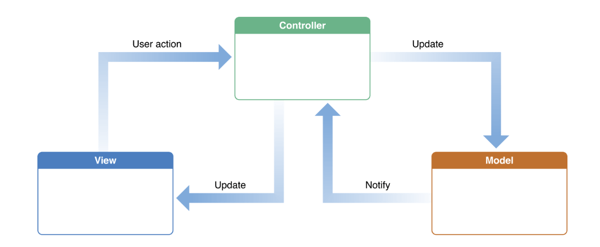
The most common schematic for MVC is a circle showing the cycle of Controller->Model->View, but in practice, it’s the controller that’s the brains. The view can simultaneously accept user interactions, such as a editable text box or a list. The model usually don’t directly update the view directly on its own like the idealized diagram.
From https://www.educative.io/blog/mvc-tutorial
With MVC, basically we are concentrating the control’s callbacks to the controller object instead of just letting each control’s callback interact with the data store (model) and view in an unstructured way.
When learning Flutter, I was exposed to the Redux pattern (which came from React). Because the tutorials was designed around the language features of Dart, the documentation kind of obscured the essence of the idea (why do we want to do this) as it dwelt on the framework (structure can be refactored into a package). The docs talked a lot about boundaries but wasn’t clearly why they have to be meticulously observed, which I’ll get to later.
The core inspiration in Redux/BLoC is taking advantage of the concept of ‘listening to a data object for changes’ (instead of UI controls/widget events)!
Instead of having the UI control’s callback directly change other UI control’s state (e.g. for display), we design a state vector/dictionary/struct/class that holds contents (state variables) that we care. It doesn’t have to map 1-1 to input events or 1-1 to output display controls.
When an user interaction (input) event emitted a callback, the control’s callback do whatever it needs to produce the value(s) for the relevant state variable(s) and change the state vector. The changed state vector will trigger the listener that scans for what needs to be updated to reflect the new state and change the states of the appropriate view UI controls.
This way the input UI controls’ callbacks do not have to micromanage what output UI controls to update, so it can focus on the business logic that generates the content pool that will be picked up by the view UI controls to display the results. In Redux, you are free to design your state variables to match more closely to the input data from UI controls or output/view controls’ state. I personally prefer a state vector design that is closer to the output view than input controls.
The intuition above is not the complete/exact Redux, especially with Dart/Flutter/React. We also have to to keep the state in ONE place and make the order of state changes (thus behavior) predictable!
Actions and reducers are separate. Every input control fires a event (action signal) and we’ll wait until the reducers (registered to the actions) to pick it up during dispatch() instead of jumping on it. This way there’s only ONE place that can change states. Leave all the side effects in the control callback where you generate the action. No side effects (like changing other controls) allowed in reducers!
Reducers do not update the state in place (it’s read only). Always generate a new state vector to replace the old one (for performance, we’ll replace the state vector if we verified the contents actually changed). This will make timing predictable (you are stepping through state changes one by one)
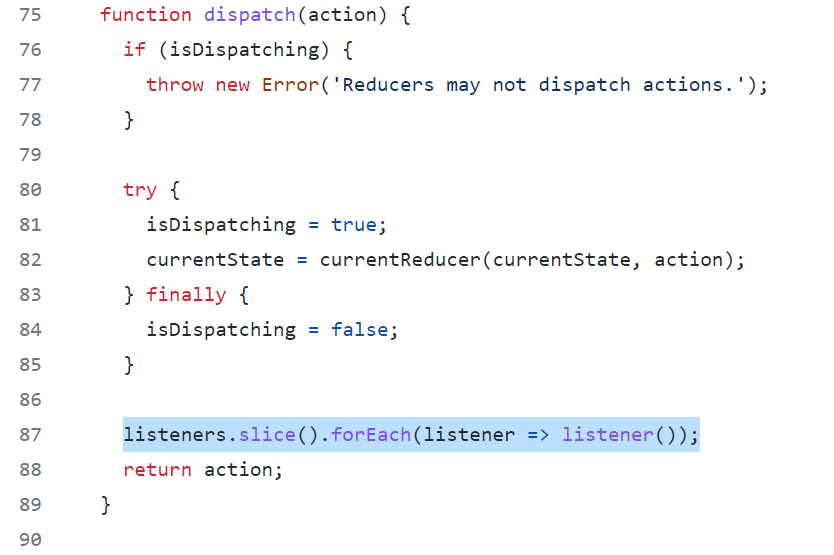
In Javascript, there isn’t really a listener actively listening state variable changes. Dispatch (which will be called every time the user interacts using control) just runs through all the listeners registered at the very end after it has dispatched all the reducers. In MATLAB, you can optionally set the state vector to be Observable and attach the change listener callback instead of explicitly calling it within dispatch.
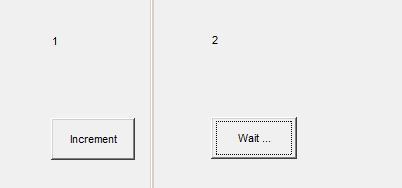
Here is an example of a MATLAB class that captures the spirit of Redux. I added a 2 second delay to emulate long operations and used enableDisableFig() to avoid dealing with queuing user interactions while it’s going through a long operation.
classdef ReduxStoreDemo < handle

    % Should be made private later
    properties (SetAccess = private, SetObservable)
        state % {count}
    end

    methods (Static)
        % Made static so reducer cannot call dispatch and indirectly do
        % side effect or create loops
        function state = reducer(state, action)
            % Can use str2fun(action) here or use a function map
            switch action
                case 'increment'
                    fprintf('Wait 2 secs before incrementing\n');
                    pause(2)
                    state.count = state.count + 1;
                    fprintf('Incremented\n');
            end
        end
    end

    % We keep all the side-effect generating operations (such as
    % temporarily changing states in the GUI) in dispatch() so
    % there's only ONE PLACE where state can change
    methods
        function dispatch(obj, action, src, evt)
            % Disable all figures during an interaction
            figures = findobj(groot, 'type', 'figure');
            old_fig_states = arrayfun(@(f) enableDisableFig(f, 'off'), figures);
            src.String = 'Wait ...';

                new_state = ReduxStoreDemo.reducer(obj.state, action);

                % Don't waste cycles updating nops
                if( ~isequal(new_state, obj.state) )
                    % MATLAB already have listeners attached.
                    % So no need to scan listeners like React Redux
                    obj.state = new_state;
                end

            % Re-enable figure obj.controls after it's done
            arrayfun(@(f, os) enableDisableFig(f, os), figures, old_fig_states);
            src.String = 'Increment';
        end
    end

    methods
        function obj = ReduxStoreDemo()
            figure();
            obj.state.count = 0;

            h_1x  = uicontrol('style', 'text', 'String', '1x Box', ...
                              'Units', 'Normalized', ...
                              'Position', [0.1 0.3, 0.2, 0.1], ...
                              'HorizontalAlignment', 'left');
            addlistener(obj, 'state', ...
                        'PostSet', @(varargin) obj.update_count_1x( h_1x , varargin{:}));

            uicontrol('style', 'pushbutton', 'String', 'Increment', ...
                      'Units', 'Normalized', ...
                      'Position', [0.1 0.1, 0.15, 0.1], ...
                      'Callback', @(varargin) obj.dispatch('increment', varargin{:}));

            % Force trigger the listeners to reflect the initial state
            obj.state = obj.state;
        end
    end

    %% These are 'renders' registered when the uiobj.controls are created
    % Should stick to reading off the state. Do not call dispatch here
    % (just leave it for the next action to pick up the consequentials)
    methods
        % The (src, event) is useless for listeners because it's not the
        % uicontrol handle but the state property's metainfo (access modifiers, etc)
        function update_count_1x(obj, hObj, varargin)
            hObj.String = num2str(obj.state.count);
        end
    end

end
Dart’s documentation at the time of writing (2021-10-27) is not as detailed as I hoped for so I don’t know if the Lambda (anonymous function) is late-binding or early-binding.
Free symbols (relevant variables in outer workspace)
bound/captured at creation (no free symbols)
left untouched until evaluated/executed (has free symbols)
Snapshot
during creation
during execution
Late-binding is almost a always a gotcha as it’s not natural. Makes great Python interview problems since the combination of ‘everything is a reference‘ and ‘reference to unnamed objects‘ spells trouble with lazy evaluation.
I’d say unlike MATLAB, which has a more mature thinking that is not willing to trade a slow-but-right program for a fast-but-wrong program, Python tries to squeeze all the new cool conceptual gadgets without worrying about how to avoid certain toxic combinations.
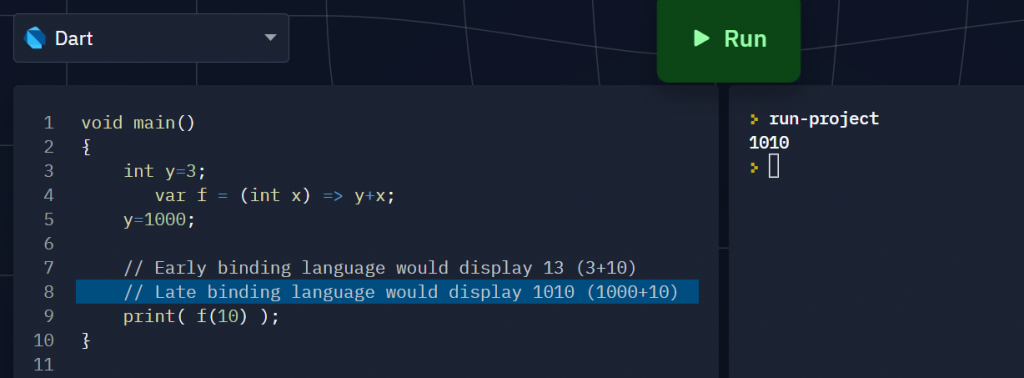
I wrote a small program to find out Dart’s lambda is late-bound just like Python:
void main()
{
  int y=3;
    var f = (int x) => y+x;
    // can also write it as
    // f(int x) => y+x;
  y=1000;

  print( f(10) );
}
The result showed 1010, which means Dart use open lambdas (late-binding)
Language
Binding rules for lambda (anonymous functions)
Dart
Late binding Need partial application (discussed below) to enforce early binding.
Python
Late binding. Can capture (bind early) by endowing running (free) variables (symbols) with defaults based on workspace variables
C++11
Early binding (no access to caller workspace variables not captured within the lambda)
MATLAB
Early binding (universal snapshot, like [=] capture with C++11 lambdas)
I tried to see if there’s a ‘capture’ syntax in Dart like in C+11 but I couldn’t find any.
I also tried to see if I can endow a free symbol with a default (using an outer workspace variable) in Dart, but the answer is no because unlike Python, default value expressions are required to be constexpr (literals or variables that cannot change during runtime) in Dart.
So far the only way to do early binding is with Partial Application (currying is different: it’s doing partial application of multiple variables by breaking it into a cascade of function compositions when you partially substitute one free variable/symbol at a time):
Add an extra outer function layer (I call it the capture/binder wrapper) putting all free variables you want to bind as input arguments (which shadows the variables names outside the lambda expression if you chose not to rename the parameter variables to avoid conceptual confusion),
then immediately EVALUATE the wrapper with the with the outer workspace variables (free variables) to capture them into the functor (closed lambda, or simply closure) which binder wrapper spits out.
Note I used a different style of lambda syntax in the partial application code example below
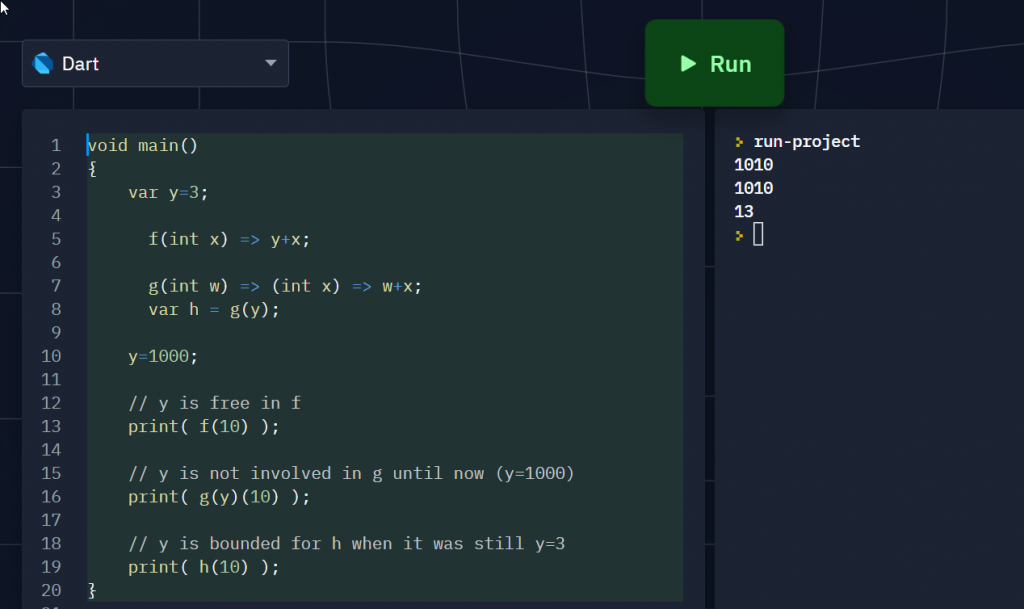
void main()
{
  var y=3;
    f(int x) => y+x;

    // Partial Application
    g(int w) => (int x) => w+x;
    // Meat: EVALUATING g() AT y saves the content of y in h()
    var h = g(y);

  y=1000;

  // y is free in f
  print( f(10) );

  // y is not involved in g until now (y=1000)
  print( g(y)(10) );

  // y is bounded for h when it was still y=3
  print( h(10) );
}
Only h() captures y when it’s still 3. The snapshot won’t happen if you cascade it with other lambda (since the y remains free as they show up in the lambda expression).
You MUST evaluate it at y at the instance you want y captured. In other words, you can defer capturing y until later points in your code, though most likely you’d want to do it right after the lambda expression was declared.
As a side note, I could have used ‘y’ instead of ‘w’ as parameter in the partial application statement
g(int y) => (int x) => y + x
but the ‘y‘ inside g() has shadowed (no longer refers to) the ‘y‘ in the outer workspace!
What makes it confusing here is that quite a few authors think it’s helpful (mnemonics-wise) to use the free variable (outer scope) name you are going to inject into the dummy (argument) as the name of the dummy! This gives the false impression of the variable being free while it’s bounded (through feeding it as a parameter in the wrapper/outer function)!
Scoping rules is a nasty source of confusion in understanding lambda calculus so I decide to give it a different name ‘w‘. I’m generally dismissive of shadowing under any circumstances, to the extent that I find Python’s @ syntactic sugar for decorators shadowing the underlying function which could have been reused somewhere (because it’s implicitly doing f=g(f) instead doing h=g(f). I hate it when you see the function with name f then f was repurposed to not mean the definition of f you saw right below but you have to keep in mind that it’s actually a g(f)). See my rants here.
Notational ambiguity, even if resolvable, is NOT helpful at all here especially when there are so many level of abstractions squeezed into so few symbols! People jumping into learning the subject quickly for the first time should not have unnecessarily keep track of the obscure scoping rules in their head to resolve the ambiguities!
Complex expressions in lambda calculus notation here is hard to parse in the head correctly until the day I started using Dart Language and noticed the connection between => lambda notation and C-style function layout. Here’s what I learned:
The expressions are right-associative because the right-most expression is the deepest nested function
Function application (feeding values to the arguments) always starts from left-to-right because you can only gain entry to a nest of functions starting from the outermost level, peeling it layer by later like an onion. So if applying arg to statement is denoted by (statement arg), the order of input would be (((statement arg1) arg2) arg3)
Names showing up on the parameter list of the nearest layer sticks to it (local to the function) and excludes everybody else (variable shadowing): this means the same name have absolutely no bearing as a free variable or being a free variable anywhere, so you can (and should) replace it with a unique name.
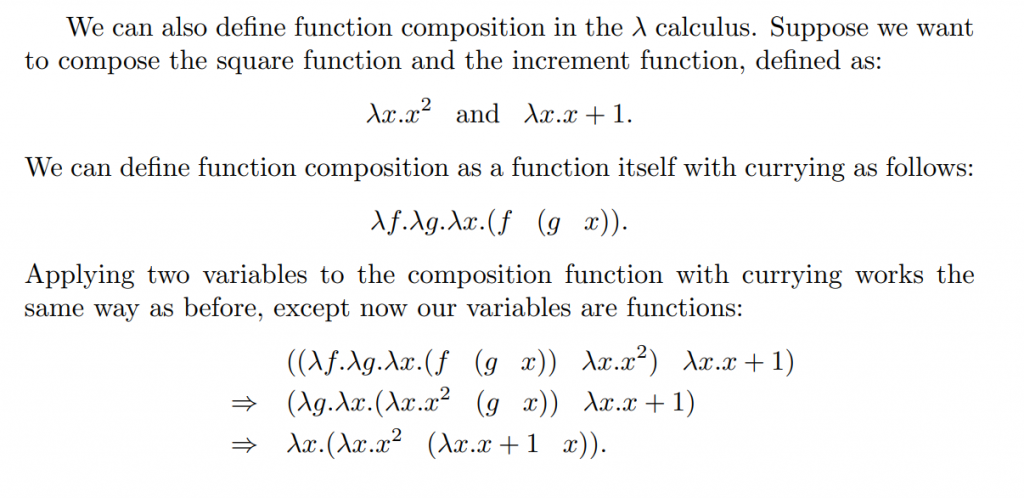
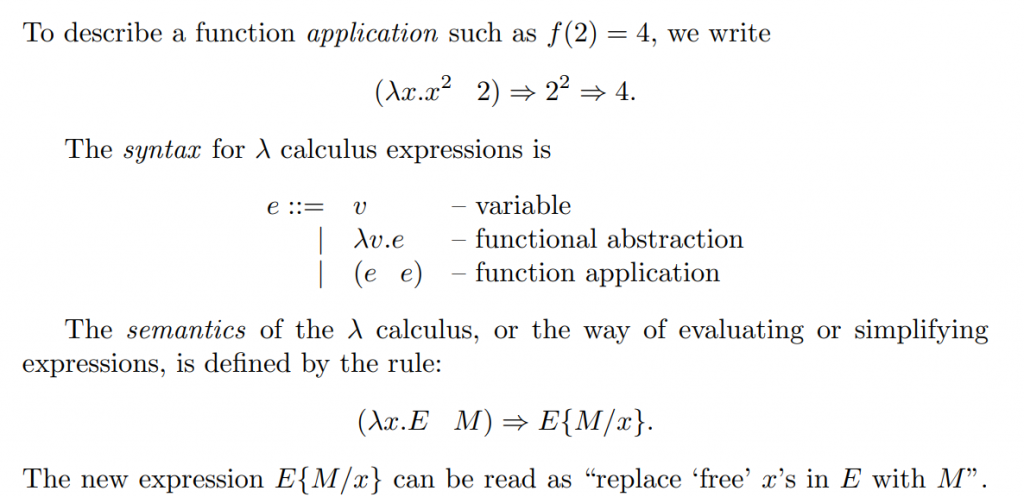
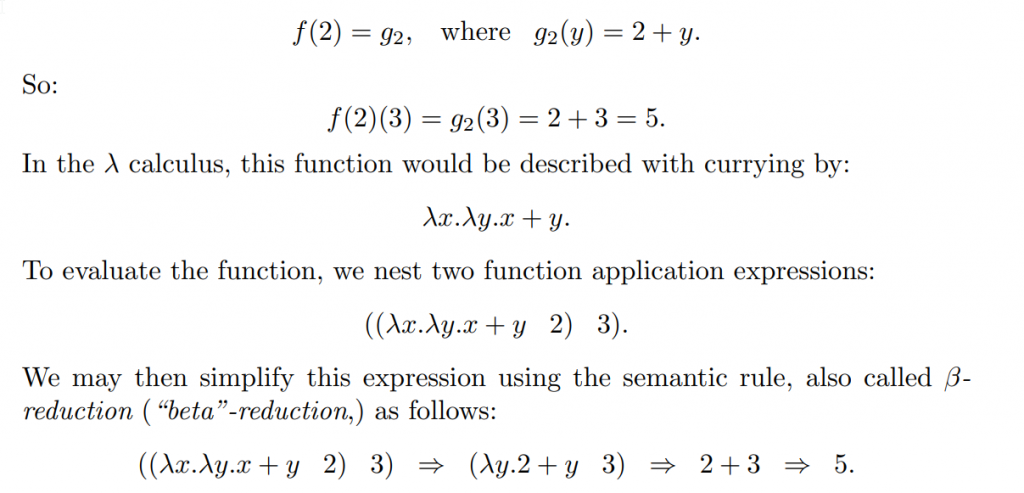
Here’s the calculus syntax in the book:
This example is the function application used above
Here’s where reusing the variable in multiple places to mean different things gets confusing as hell, and the author (as well as the nomenclature) do not emphasize the equivalence to variable shadowing rules:
This can be rewritten as having
Upon application,
which clearly reads for an input of , it’ll be incremented first then squared. Resolving further:
The evils of variable shadowing again! Not only it makes the code hard to read and reason, it also make the mathematics hard to follow!


 in multiple places to mean different things gets confusing as hell, and the author (as well as the nomenclature) do not emphasize the equivalence to variable shadowing rules: