Create user account using email address (like your Microsoft account) in Windows 7/2008

If you live in a mixed environment of Windows 7 and 8/10 computers, you might want to set the usernames to be the same so you can share the files/printers without managing Homegroup.

Nonetheless, in Windows 7/2008, if you try to create a user account using the traditional tool (Local Users and Groups) in Computer Management, you are not allowed to use email address as user name because they banned the at-mark (@):
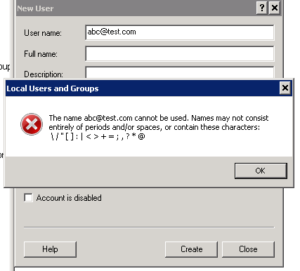
I searched the web for quite a while, came across stuff like UPN (User Principal Name) without luck (No active directory on Windows 7, nor I want to setup a domain controller in Windows 2008 for home network). Turns out the solution is dead simple: use the “User Account” from Control panel to create the user account. No questions asked!

Loading

“Copy as path” option in Microsoft Windows

Very often I want to copy the full path of a file to my MATLAB environment for quick testing. Before my coworker showed me the trick, I tried to staple the filename I copied from the Explorer window to the address bar then re-copy the whole. That was dumb.

For some reason, Windows stowed away a slick feature called ‘Copy as Path’. You have to hold “SHIFT” key while right-clicking to get the good stuff displayed (same as “Open Command Window Here”).  What a crime!

This website shows you a way to have the menu option activated by default:
http://www.askvg.com/registry-tweak-to-add-copy-as-path-option-in-files-and-folders-context-menu-in-windows/

Loading