Other than xkcd, which also integrates my favorite topics such as math, I found MonkeyUser comics, which is more specifically for software engineering:
https://www.monkeyuser.com/2017/http-status-codes-community/?sc=true&dir=random

Other than xkcd, which also integrates my favorite topics such as math, I found MonkeyUser comics, which is more specifically for software engineering:
https://www.monkeyuser.com/2017/http-status-codes-community/?sc=true&dir=random
Most teaching materials on XOR starts from its straight definition then a bunch of recipes for exploiting XOR. It is not convenient to remember and not intuitive to come up with new tricks on our own. Instead, I’d like to describe XOR as two intuitive operations:
The second interpretation (toggling) is actually way more powerful and easy to remember than the first interpretation (definition).
With the toggling interpretation, you don’t have to think hard to come up with the four algebraic properties:
The XOR swap trick can be constructed by exploiting the fact that flipping the same switch twice (at any point) reverts it back to where it started:
 |
 |
||
| Start |  |
 |
|
| Mix with |
 |
No info is lost, still have somewhere to undo if we wish. |
|
The incumbent is used to cancel the inside  to recover to recover |
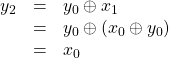 |
Since is already saved (mixed with) , we don’t have to worry about losing it as long as we get to our main goal of putting in , which will be used as a recovery key later. |
|
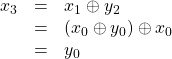
Now use the stored in  to unmix to recover to unmix to recover |
 |
Note that this trick is obsolete for modern computer architecture because
Adding a check for the degenerate case (self-swap) slows the program down even further, making it worse than using a temporary storage for swapping. Therefore there’s no good reason to use it unless you have an exotic use case.
This is mainly used as a teaching device (or homework problem) to teach that XOR-ing even instances of the same variable in the chain cancels it.
Although I am a big fan of MATLAB, it’s time for me to really try out Python so I can fairly compare the pros and cons of both languages.
The first tiny hurdle for Python is its scattered installation process for Windows. I thought Python(x,y) will give me everything in one place, but turns out the Spyder is stuck in Python 2.7. To install Python 3.7, I’ll need to do it from scratch. Here are the steps:
{python37}/scriptspython -m pip install --upgrade pipPython37\python.exe: No module named pip, so you might want to use ensurepip to bootstrap: python -m ensurepip pip install PyQt5pip install Spyder{Python37}/Scripts/spyder3.exepip install pyvisapip install PySerialpip install scipypip install pandaspip install matplotlibpip install sympyUpdate: I tried Anaconda (2019.03, Python 3.7.3 x64) which supposedly have everything in one place, but the Spyder it included crashes right out of the box. Jyupter is confusing as it relies on the web-browser to render the results. Feels patchy and doesn’t look like it adds more than the steps above. Uninstalled it without hesitation.
Update: To update the packages, tack -U switch at the end of each of the above pip install commands. Remember to follow the order of dependencies (e.g. update PyQt5 before Spyder)
I’ve seen a lot of ugly implementations from people trying to deal with variable number of input and output arguments. The most horrendous one I’ve seen so far came from MIT’s Physionet’s WFDB MATLAB Toolbox. Here’s a snippet showing how wfdbdesc.m handles variable input and output arguments:
function varargout=wfdbdesc(varargin)
% [siginfo,Fs,sigClass]=wfdbdesc(recordName)
...
%Set default pararamter values
inputs={'recordName'};
outputs={'siginfo','Fs','sigClass'};

for n=1:nargin
    if(~isempty(varargin{n}))
        eval([inputs{n} '=varargin{n};'])
    end
end
...
if(nargout>2)
    %Get signal class
    sigClass=getSignalClass(siginfo,config);
end
for n=1:nargout
    eval(['varargout{n}=' outputs{n} ';'])
end
The code itself reeks a very ‘smart’ beginner who didn’t RTFM. The code is so smart (shows some serious thoughts):
nargout to control varargout to avoid the side effects when no output is requestedvarargin so it can be symmetric to varargout (also handled similarly). varargout might have a benefit mentioned above, but there is absolutely no benefit to use varargin over direct variable names when you are not forwarding or use inputParser().but yet so dumb (hell of unwise, absolutely no good reason for almost every ‘thoughtful’ act put in) at the same time. Definitely MIT: Make it Tough!
This code pattern is so wrong in many levels:
varargin/varargoutvarargin and varargout cells unnecessarilyeval() just to do simple cell assignments! Makes me cringe!Actually, eval() is not even needed to achieve all the remaining evils above. Could have used S_in = cell2struct(varargin) and varargout=struct2cell(S_out) instead if one really wants to control the list of variable names manually!
The hurtful sins above came from not knowing a few common cell packing/unpacking idioms when dealing with varargin and varargout, which are cells by definition. Here are the few common use cases:
C{:} unpacks to comma separated lists!
function caller(varargin)
   callee(varargin{:});
[C{:}] on left hand side (assignment) means the outputs are distributed as components of C that would have been unpacked as comma separated lists, i.e. [C{:}] = f(); means [C{1}, C{2}, C{3}, ...] = f();
function varargout = f()
// This will output no arguments when not requested,
// avoiding echoing in command prompt when the call is not terminated by a semicolon
    [varargout{1:nargout}] = eig(rand(3));
function varargout = f(varargin)
// This one is effectively deal()
    varargout = varargin(1:nargout);
end

function varargout = f(C)
// This one unpacks each cell's content to each output arguments
    varargout = C(1:nargout);
end
One good example combining all of the above is to achieve the no-output argument example in #2 yet neatly return the variables in the workspace directly by name.
function [a, b] = f()
// Original way to code: will return a = 4 when "f()" is called without a semicolon
    a = 4;
    b = 2;
end

function varargout = f()
// New way: will not return anything even when "f()" is called without a semicolon
    a = 4;
    b = 2;
    varargout = manage_return_arguments(nargout, a, b);
end

function C = manage_return_arguments(nargs, varargin)
    C = varargin(1:nargs);
end
I could have skipped nargs in manage_return_arguments() and use evalin(), but this will make the code nastily non-transparent. As a bonus, nargs can be fed with min(nargout, 3) instead of nargout for extra flexibility.
With the technique above, wfdbdesc.m can be simply rewritten as:
function varargout = wfdbdesc(recordName)
% varargout: siginfo, Fs, sigClass
...
varargout = manage_return_arguments(nargout, siginfo, Fs, sigClass);
Unless you are forwarding variable arguments (with technique#1 mentioned above), input arguments can be (and should be) named explicitly. Using varargin would not help you avoid padding the unused input arguments anyway, so there is absolutely no good reason to manage input variables with a flexible list. MATLAB already knows to skip unused arguments at the end as long as the code doesn’t need it. Use exist('someVariable', 'var') instead.
The general wisdom about eval() is: do not use it! At least not until you are really out of reasonable options after consulting more than 3 experts on the newsgroups, forums and support@mathworks.com (if your SMS is current)!
Abusing eval() turns it into evil()!
The elves running inside MATLAB needs to be able to track your variables to reason through your code because:
eval() cannot be pre-compiled)This is called ‘transparency’: MATLAB has to see what you are doing every step of the way. According to MATLAB’s parallel computing toolbox’s documentation,
Transparency means that all reference to variables must be visible in the text of the code
which I used as a subtitle of this post.
The 3 major built-in functions that breaks transparency are:
eval(), evalc(): arbitrary code execution resulting in read and write access to its caller workspace.assignin(): it poofs variables in its caller’s workspace!evalin(): it breaks open the stack and read the variables in its caller’s workspace!They should have been replaced by skillful use of dynamic field names, advanced uses of left assignment techniques, and freely passing variables as input arguments (remember MATLAB uses copy-on-write: nothing is copied if you just read it).
There are other frequently used native MATLAB functions (under certain usages) that breaks transparency:
load(): poof variables from the file to the workspace. The best practice is to load the file as a struct, like S=load('file.mat'); , which is fully transparent. Organizing variables into structs actually reduces mental clutter (namespace pollution)!save(), who(), whos(): basically anything that takes variable names as input and act on the requested variable violates transparency because it’s has the effect of evalin(). I guess the save() function chose to use variable names instead of the actual variables as input because copy-on-write wasn’t available in early days of MATLAB. A example workaround would be:
function save_transparent(filename, varargin)
    VN = arrayfun(@inputname, (2:nargin)', 'UniformOutput', false);
    if( any( cellfun(@isempty, VN) ) )
        error('All variables to save must be named. Cannot be temporaries');
    end

    S = cell2struct(varargin(:), VN, 1);
    save(filename, '-struct', 'S');
end

function save_struct_transparent(filename, S)
    save(filename, '-struct', 'S');
end
The good practices to avoid non-transparent load/save also reduces namespace pollution. For example, inputname() peeks into the caller to see what the variable names are, which should not be used lightly. The example above is one of the few uses that I consider justified. I’ve seen novice abusing inputname() because they were not comfortable with cells and structs yet, making it a total mindfuck to reason through.